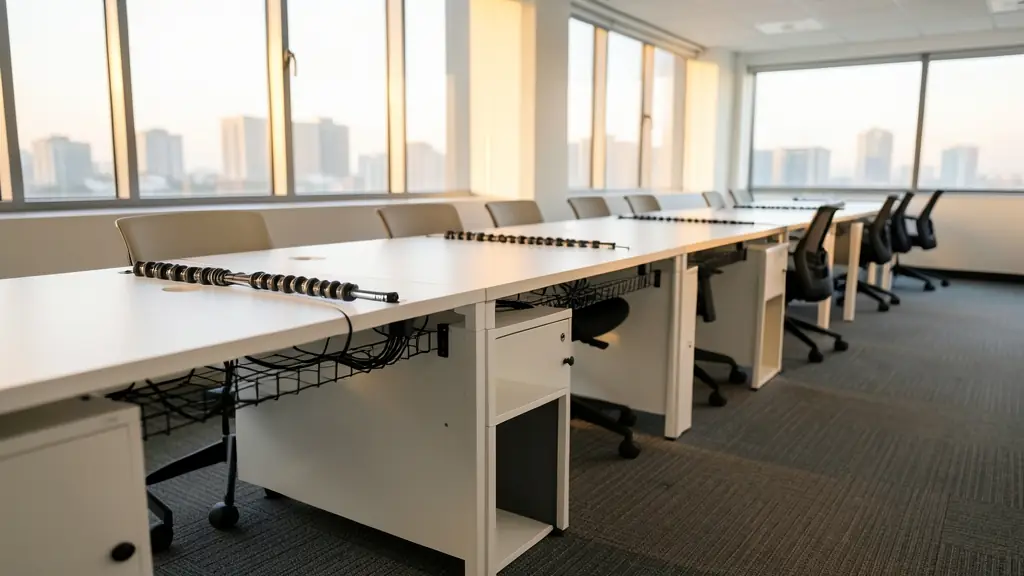
Cable management is the gear and the habits that keep power, data and screen cables routed, supported and labelled instead of hanging loose on the floor. On a desk that means a tray underneath, a grommet in the top and a spine down the leg. Behind a TV it means a wall channel or a plug point at the right height. In a comms cupboard it means patch leads cut to length and labelled. Done properly, it stops trips, pulled plugs and the hour lost hunting for which lead goes where.
Under desk cable management
Start with where the power and data reach the desk: a floor box, dado trunking on the wall, or a power pole from the ceiling. From there:
- An under desk tray or wire basket holds the power strip, adaptors and spare cable off the floor.
- A cable spine or a riser carries the bundle from the floor up the leg in one neat column.
- A grommet in the desktop lets the laptop and screen leads drop through without a gap.
- Hook and loop straps hold bundles together and come undone, unlike cable ties that get snipped and nick the jacket.
For 60 desks on an open plan floor, plan the points per desk first; see floor trunking and dado trunking.
TV walls and home offices
A wall mounted TV with three leads trailing to the floor ruins the look. A short run of mini trunking painted the wall colour hides the HDMI and aerial cables on a face brick or plastered wall. If you want nothing visible, ask an electrician to put a plug point behind the TV; an extension cord pushed into the wall cavity is not a safe substitute. A home office on the inverter often adds a second power strip, so leave room in the tray.
Server cupboards and comms cabinets
The usual mess is long patch leads coiled in front of the switch. Cut or buy leads close to the length you need, run them through horizontal managers, label both ends with the same number, and keep power leads to one side of the cabinet and data to the other. Above the ceiling, wire mesh tray carries the data runs to the cupboard and lets cables stay visible for the next change.
Shops, kitchens and who does what
At a till counter, power, the card machine, the scanner and the network cable meet in a small space that gets kicked all day; a lidded trunking run inside the counter keeps them tidy. In a restaurant kitchen keep cables off the floor where they get mopped. As a split: an electrician wires the plugs and fixed trunking and issues the CoC, while an IT or cable management installer handles trays, spines and patching. Size trunking with the trunking fill calculator.
What to put in your request
- Count the desks, screens and TVs involved
- Say where power and data reach each desk
- Mention a server cupboard or comms cabinet
- Ask if new plug points are needed
- Ask for after hours work if the office is busy
Cable Management: who asks for them and why
- Homeowners, landlords and DIY: TV wall cables hidden in painted mini trunking and a tidy home office desk
- Electricians and electrical contractors: new plug points at TV height and desk height before the trays go in
- Offices, co-working spaces and IT teams: trays, spines and grommets on every desk of an open plan floor
- Shops, restaurants, salons and malls: till counters where card machine, scanner and power leads get kicked daily
- Factories, warehouses, mines and workshops: control room consoles and workshop benches with leads routed off the floor
- Builders, developers and shopfitters: fit out packages where desks arrive after the floor boxes are set
- Server rooms, data, CCTV and solar installers: patch leads cut to length and labelled in a comms cabinet or server room
- Schools, clinics, churches and municipalities: school computer labs and library desks where loose leads trip learners